Best Mobile — Automotive Services App
An end-to-end mobile platform connecting car owners with trusted technicians, making it easier to discover, book, and manage vehicle repair and maintenance services.
Role
Duration
Tools
Team

Best Mobile is a mobile app that helps car owners in the US get their car problems solved. Owners describe what's wrong through a guided request, and Best Mobile's team reviews it, posts it to vetted technicians and assigns the best fit. For minor issues, owners can fix it themselves with DIY guides or buy parts from a built-in spare parts marketplace.
As the Product Designer, I designed the experience for car owners and technicians. The core challenge was making car repair feel as simple and trustworthy as booking any other digital service, even for owners who can't describe exactly what's wrong.
Finding a good mechanic in the US is still largely luck. Drivers rely on recommendations, scattered reviews and calls to local shops, while skilled technicians struggle to be found beyond their own network.
For car owners
No easy way to judge who's qualified
Hard to describe what's wrong with the car
Minor fixes still mean a trip to the shop
Calls to shops often go unanswered
Little visibility once work begins
For technicians
New customers come mostly by word of mouth
Few ways to find work beyond their network
Job requests arrive incomplete and unstructured
Discovery focused on how drivers find mechanics today and what technicians need to take on new work. I reviewed the brief and studied competing car service apps to understand where trust breaks down on both sides.
2
User Groups Mapped
2
Journeys Mapped
5
Competitor Audits
Research insights
Trust needs a middleman. Owners can't vet mechanics themselves, so a human review step builds confidence.
Owners speak in symptoms. People describe what they hear or feel, not the fault, so requests need guiding.
Not every problem needs a technician. Minor issues can be solved with the right guide or part.
Technicians need context to apply. The car, the symptoms and the pay decide whether they take a job.
Silence creates anxiety. Once a request is sent, owners want to know someone is on it.

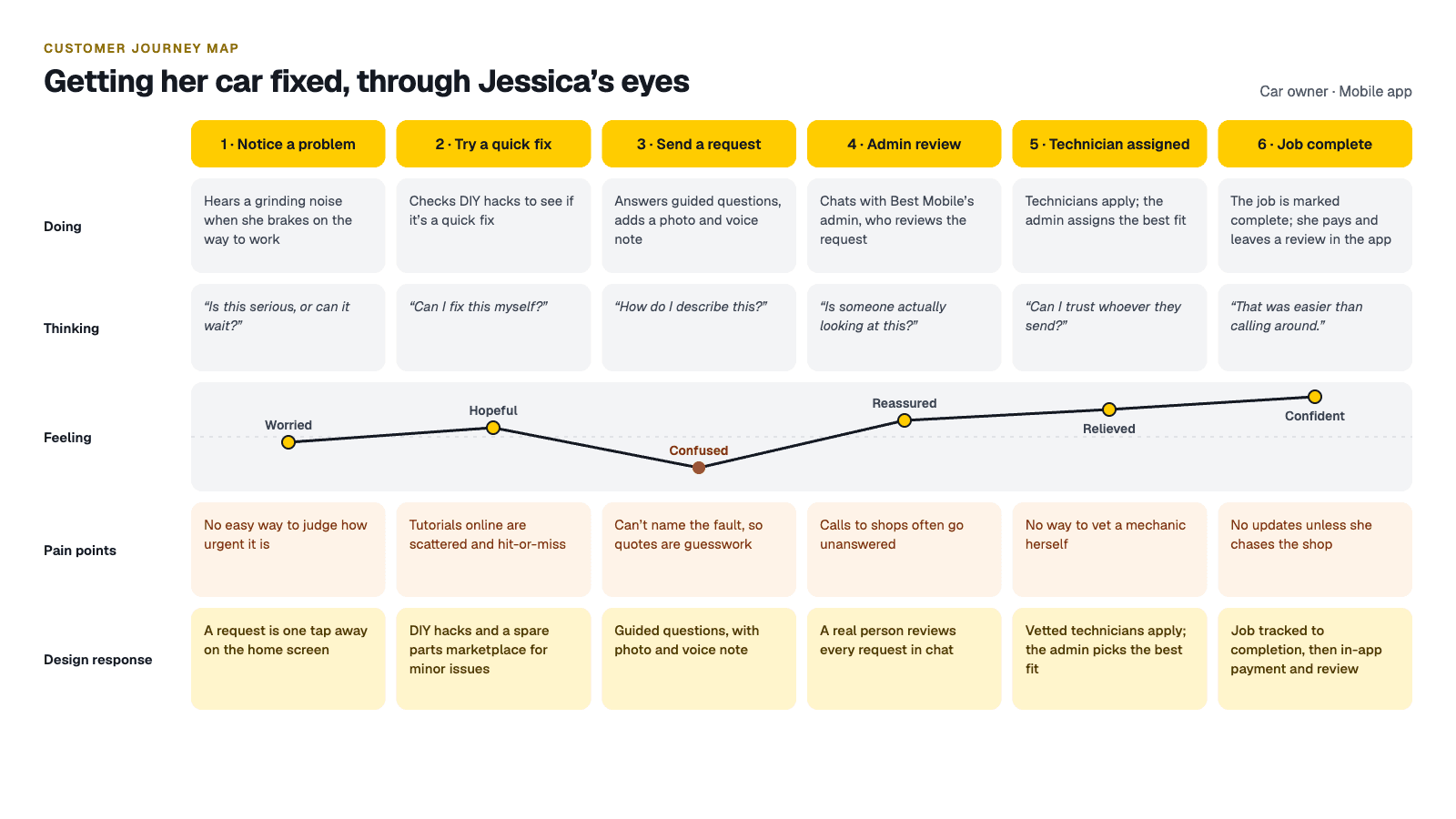
Working from the brief, I started from the moment a driver realises something is wrong. Two questions shaped everything: how does someone who isn't a car expert explain the problem, and how do they know who to trust?
We converged on "Symptom to Solution." Owners start with what they notice, not what they'd need to know. Minor issues lead to DIY guides and spare parts. Everything else becomes a guided request that Best Mobile's admin reviews, posts to vetted technicians, and assigns to the best fit.

I mapped three primary journeys: fixing a minor issue, requesting a technician, and applying for a job. The priority was the request journey, from noticing a problem to a technician being assigned, because that's where trust is won or lost.
Minor issue to fix. The owner checks DIY hacks or buys a part from the spare parts marketplace.
Request to assignment. The owner sends a guided request with a photo and voice note. The admin reviews it, posts the job, and assigns the best technician from those who applied.
Job to completion. The technician sees the job, applies, and moves it from active to completed. The owner then pays and leaves a review in the app.

The final wireframes achieved over 92% task completion rate in structured walkthroughs.
I designed mid-fidelity layouts for the key screens on both sides of the marketplace, from the guided service request and technician matching to booking, job tracking and the technician's request inbox. Working in mid-fi kept the focus on structure: what an owner needs to see before they trust a technician, and what a technician needs to know before they accept a job.


The visual direction needed to feel confident and reassuring for drivers dealing with a stressful problem, while staying quick to use, often one-handed and on the go. I anchored the system in a bold yellow, borrowed from the world of roadside help and warning signs, for primary actions such as "Send request" and "Set automatically," with a softer yellow for secondary choices. Calm, light grey surfaces and generous rounded cards keep longer screens like the guided request and vehicle details easy to scan. Typography uses Inter, whose clear, neutral forms let owners, technicians and the admin read a request, a job or a part listing at a glance.


I built high-fidelity interactive prototypes in Figma for the three primary journeys: fixing a minor issue with DIY guides or spare parts, sending a guided request through to a technician being assigned, and a technician applying for and completing a job. The prototypes were reviewed with the team, walking through each flow to check that owners could describe a problem without knowing the fault, and that every request reached a technician with the context they needed.
3 Journeys Prototyped 3 User Roles Covered 92% Task Success Rate
Iteration 1: A guided request instead of a blank box. Owners struggled to describe faults in their own words, so I replaced free text with guided questions (issue type, when it started, warning lights) plus a photo and voice note. Result: every request arrives with the details a technician needs to quote.
Iteration 2: Vehicle details saved once. Re-entering car details on every request added friction. I moved them to a one-time vehicle profile. Result: repeat requests are faster, and every job shows the exact make, model and year.


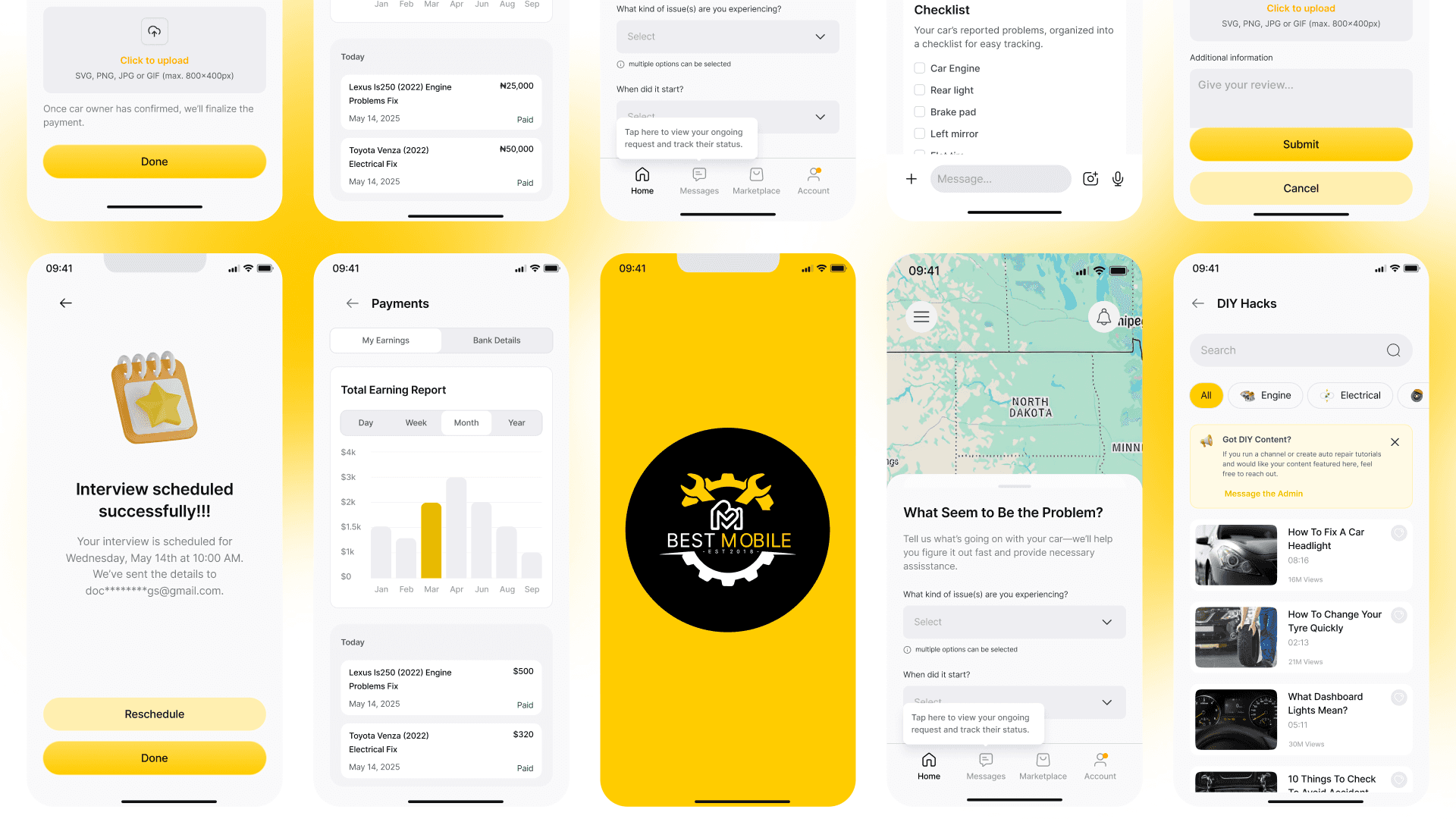
The final design, built around "Symptom to Solution," gives US drivers one app for every car problem, from a quick DIY fix to a vetted technician. Key features include:
Location-aware home that connects owners with professionals and services nearby
Guided service request covering issue type, when it started and warning lights, with photo and voice note support
Saved vehicle profile so make, model and year are entered once
Admin review in chat, with a clear request summary before any job is posted
Technician jobs board with All, Applied, Active and Completed tabs, showing the car, symptoms and pay for each job
In-app payment and reviews once a job is complete
Spare parts marketplace with categories and brand-new or used listings
DIY hacks, a video library filtered by category, with an invite for creators to share their own guides




3 ways to fix a car: DIY, spare parts or a vetted technician
3 user roles in one flow: owner, admin and technician
1 guided request that turns symptoms into a clear job
"Drivers don't need to know what's wrong anymore. They just tell us what they notice."
People describe car problems in feelings, not faults. Designing around symptoms made the request usable for anyone, not just car enthusiasts.
Trust in a marketplace can come from a person, not just a profile. A human review step reassured owners more than any rating could.
Not every problem needs the full service. Offering DIY and spare parts alongside technicians made the app useful for small issues too.
Structure helps both sides at once. The same guided request that eases the owner's job gives technicians the context they need to apply.
AI symptom checker. Suggest a likely cause and urgency from the owner's answers, photo and voice note before the request is sent.
Maintenance reminders. Use the saved vehicle profile to prompt owners about oil changes, inspections and recalls.

